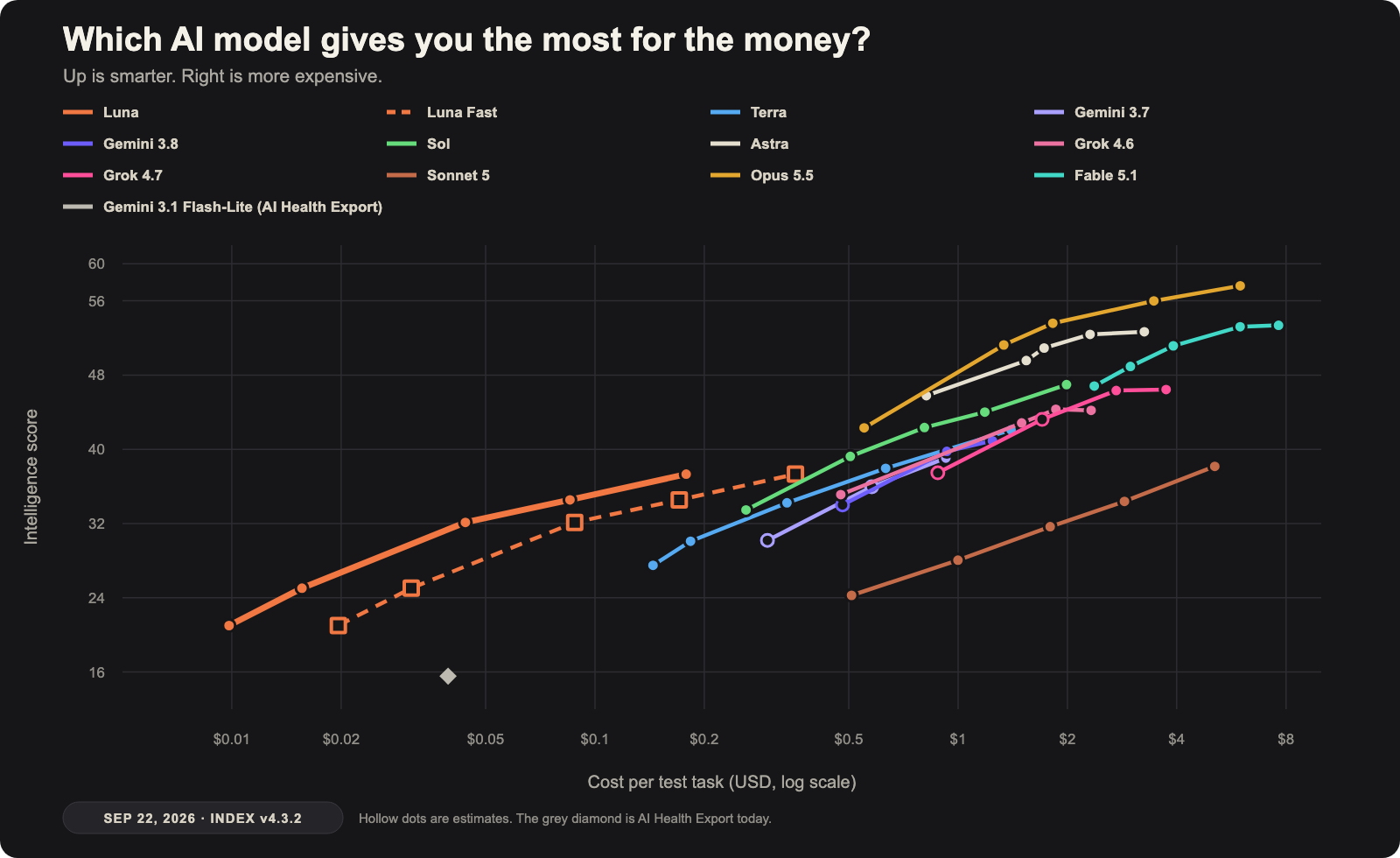
Updated September 22: Every line was remeasured on Artificial Analysis Intelligence Index v4.3.2. The old scores and these scores are not the same scale, so this is a new chart. Opus 5.5 replaces Opus 5. Grok 4.7, Sonnet 5, and Gemini 3.8 Flash are new. The grey Gemini 3.1 Flash-Lite dot stays because AI Health Export still uses it.
I like this chart because I can understand it in about five seconds. I do not have to read a hundred posts about why one model is supposedly destroying another model this week.
Most connected dots are different amounts of thinking. The higher the dot, the smarter it tested. The farther right it goes, the more it costs.
What I see
Opus 5.5 takes the top, and the practical point is not max. At high effort it scores 53.6 for about $1.82 per task. Fable 5.1 max scores 53.4 and costs about $7.63. At max, Opus 5.5 reaches 57.6, the highest score here, for about $5.98. The best value is not automatically the highest dot.
Why I retest instead of re-reading
The “40% cheaper” line is a typical-work claim. The token price dropped 20%, from $5 and $25 to $4 and $20 per million. Cache reads dropped from $0.50 to $0.20. Anthropic’s 40% figure is their blend for typical work at the default medium setting. On this test, medium is about 39% cheaper than Opus 5 medium. Max is about 2% more expensive than Opus 5 max, because it thinks longer.
That is the practical argument for keeping operations model agnostic. If switching models is a config change instead of a rewrite, a pricing special turns into free capacity to get real work done. If it is a rewrite, the special expires before the argument about it finishes. Making the chart is the easy part, using it is the point.
What changed?
I remeasured the whole chart on one new test and kept the last two generations, plus the Gemini the app still runs. Hollow dots are thinking levels a vendor offers when the measured cost was missing or copied from another model. Sonnet 5 stays because the cheaper Claude settings are a real choice. Its max costs about as much as a top model and scores much lower on this test.
I also made the chart interactive. Hover over a model to bring its line forward. Click one to keep it highlighted while you look at the details.
The one gray Gemini 3.1 Flash-Lite dot stays because it gives me a useful comparison for AI Health Export.
Want to see the methodology?
Where these numbers come from, what counts as measured versus estimated, and a running log of what changed on every update, including the one where a model's cost moved 12% with no price change behind it. How the model chart is built →
Why am I looking at this?
I am thinking about Luna and Gemini for AI Health Export after version 3.0. I am not changing anything yet. I just want to live with the tradeoff for a while and see what starts to make sense.
Technically, I am already using Luna in one real place: Hermes, my personal AI agent. That is part of why I keep looking at it.
The chart does not need to answer everything. Later, I can try both models inside the real app and see which one feels faster and gives better answers. For now, this gets me 90% of the way there.
The bigger idea
I never want a project trapped inside one AI model, whether it is an app, a website, an internal tool, or something I am building for a client. So I keep the important parts in a set of mostly Markdown documents: the project history, decisions, instructions, rules, and step-by-step playbooks that any AI agent can read. That is the basic idea behind AgentOps, a system I built to keep my work organized and portable. Claude, GPT, Gemini, or whatever comes next can pick up those same documents and understand how the project works. If something better comes along, I can switch models without starting over. I think everyone doing serious work with AI should build some version of this.
If your own AI setup feels more confusing than helpful, that is exactly the kind of mess I like untangling.